
Grow your customers
Profiles, history & preferences. A full CRM with Neon Customers
Every interaction in one timeline. See purchase history, rental contracts, booking records, and communication logs for each customer.
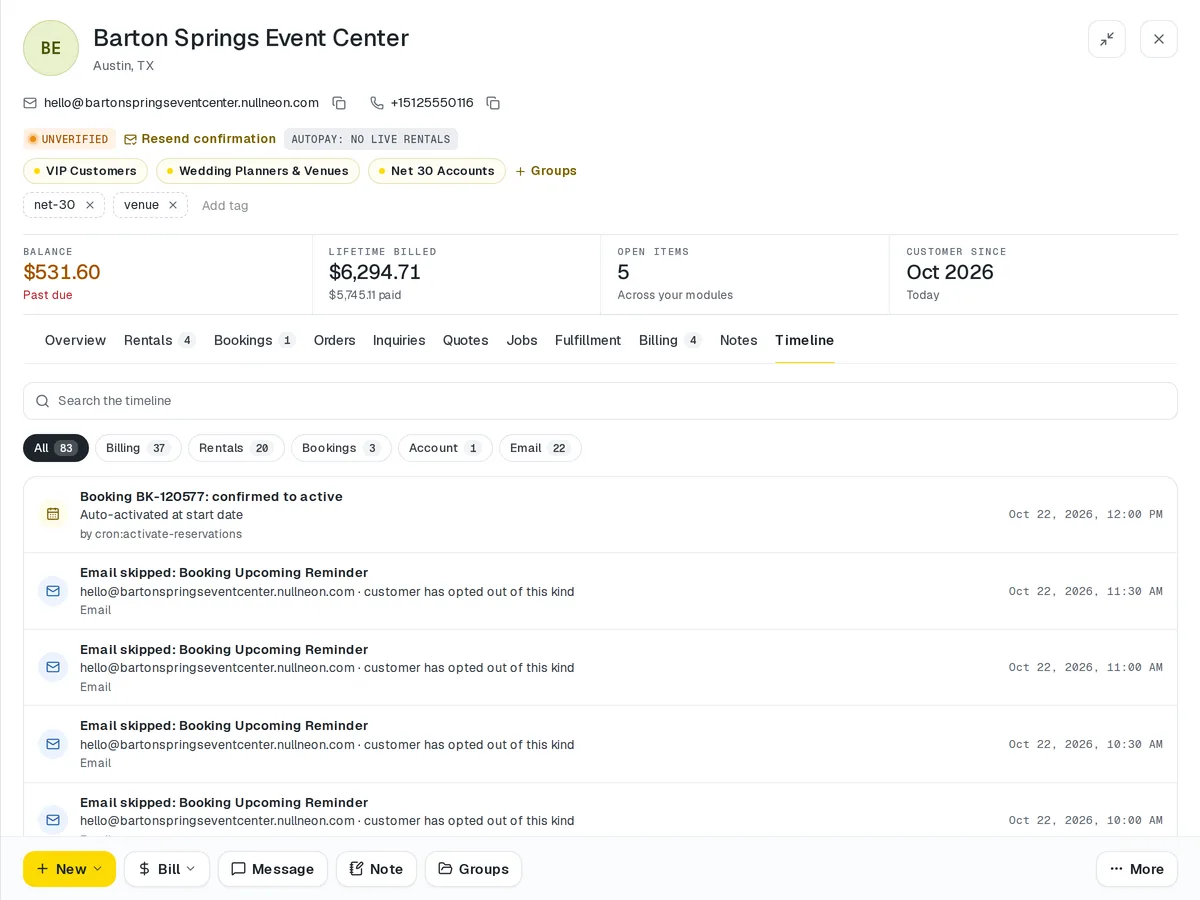
Customers that's connected from the first record
Every interaction in one timeline. See purchase history, rental contracts, booking records, and communication logs for each customer. Segment your audience, tag VIPs, and let the system surface insights so you can build relationships that last.
How it works
Every touch, on one record.
- Step 1First purchase or booking
The customer record comes from it. Nothing typed twice.
- Step 2History builds
Orders, rentals and bookings land on one timeline.
- Step 3Segment rules set
Tags and rules for the groups you care about.
- Step 4Sorted into segments
Customers move in and out of them as their records change.
- Step 5Messages logged
Every email and SMS sits beside the orders it was about.
Customers · 4 features
Every feature you need, all in a single system.
- 01
Unified customer profiles
Custom fields, tags and loyalty tier sit on one profile, with every order, booking and message beneath them.
- 02
Purchase & booking history
See each customer's purchases, rental contracts and bookings together in one place.
- 03
Segmentation & tags
Group customers by anything on their record and tag VIPs, so the right list is always one filter away.
- 04
Communication logs
Every conversation is logged on the customer's record, right beside their history.
What makes Customers in Neon fit your business?
All of it is configured from the admin panel. No developer, no plugin, no second tool.
- Custom profile fields & data types
- Segment & tag taxonomies
- Loyalty tier definitions
- Communication channel preferences
- Custom note categories
- Export format templates
Customers works with the rest of Neon
Nothing gets re-entered between them.
Or just ask Neo.
Press ⌘CtrlK on any screen and say what you want. Neo finds the screen, reads your live numbers and fills the form in. You press submit.
Check out other Neon features:
Outreach
Campaigns, updates & customer messaging.
Learn moreSEO
Meta tags, sitemaps & search optimization.
Learn moreBlog
Publish articles, news & company updates.
Learn moreInventory
Track stock, manage products, automate reorder points.
Learn moreRentals
Combos, options, rules & automated billing.
Learn moreBookings
Combos, options, scheduling & confirmations.
Learn moreIt's time to run Customers on one login.
Every account starts with a short conversation. Tell us what you run and we'll set it up with you.