
Run your operations
Track stock, manage products, automate reorder points with Neon Inventory
Keep every product, variant, and SKU in one place. Set low-stock thresholds that trigger automatic reorder alerts, track quantities across multiple locations, and get real-time visibility into what's moving and what's sitting.
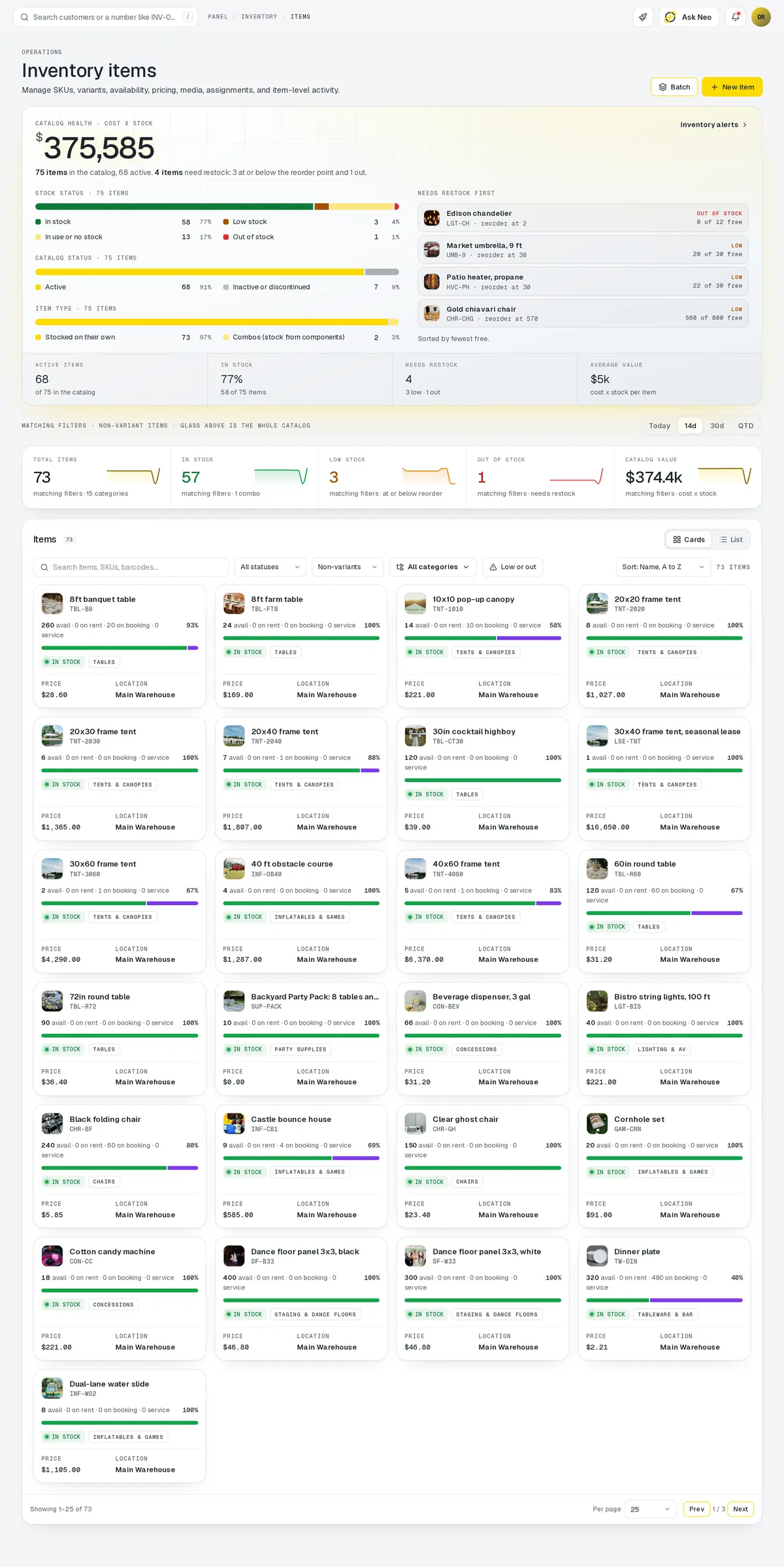
Inventory that's connected from the first record
Keep every product, variant, and SKU in one place. Set low-stock thresholds that trigger automatic reorder alerts, track quantities across multiple locations, and get real-time visibility into what's moving and what's sitting. Pairs seamlessly with the Storefront and Invoicing modules to keep numbers in sync without double entry.
Inventory is included with every plan, because every other module reads from it.
How it works
The reorder point does the watching.
Set a threshold once per SKU. Anything that drops under it is flagged on its own, and the ones already on order say so.
Inventory · 4 features
Every feature you need, all in a single system.
- 01
Multi-location tracking
See quantities at every location, so you always know where stock is sitting.
- 02
Low-stock alerts
Set a threshold per location and get a reorder alert before you run out.
- 03
Barcode / SKU support
Every product, variant and SKU lives in one place, ready to scan.
- 04
Bulk import & export
Bring your whole catalog in at once and export it on your own templates.
What makes Inventory in Neon fit your business?
All of it is configured from the admin panel. No developer, no plugin, no second tool.
- Custom product variants & attributes
- Configurable category hierarchies
- Per-location reorder thresholds
- Warehouse zone mapping
- Barcode format preferences
- Custom export & report templates
Inventory works with the rest of Neon
Nothing gets re-entered between them.
Or just ask Neo.
Press ⌘CtrlK on any screen and say what you want. Neo finds the screen, reads your live numbers and fills the form in. You press submit.
Check out other Neon features:
Rentals
Combos, options, rules & automated billing.
Learn moreBookings
Combos, options, scheduling & confirmations.
Learn moreEmployees
Staff records, time clock, scheduling & PTO.
Learn moreDeliveries
Route planning, tracking & real-time updates.
Available in Texas only today
Learn moreShipping
Rates, labels & tracking for orders that ship.
Learn morePickup
Order online, collect in store, with ready-for-pickup alerts.
Learn moreIt's time to run Inventory on one login.
Every account starts with a short conversation. Tell us what you run and we'll set it up with you.